Ask Ottto inside ChatGPT.
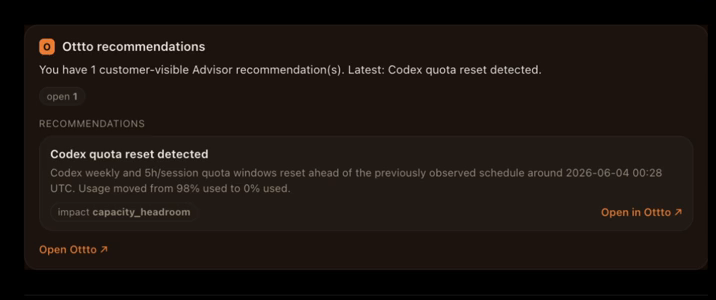
Ottto answers in ChatGPT too. Ask about your AI coding-agent spend in plain language and get the same trusted numbers back as inline cards - cost, what changed, source health, and reviewed savings recommendations. Read-only, and never your raw prompts or keys.
Your AI spend, in the chat you already use.
No dashboard to open, no export. Ask in plain language and Ottto returns a compact card built from your own account - the same reconciled numbers you see in the web app.
 ChatGPT
Ottto
ChatGPT
Ottto 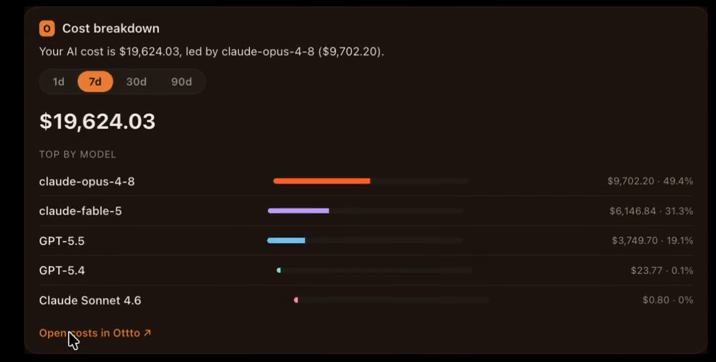
It can read your numbers. It can't touch your account.
The app is read-only and data-minimized at the boundary - a projector builds every payload by allowlist, so the things ChatGPT should never see never leave.
Account snapshot, what-changed-this-week, source health, and reviewed recommendations. No tool can change your account.
Every field is opted in by allowlist. Raw prompts, file paths, device ids, emails, and API-key prefixes never cross the boundary.
OAuth 2.1 with PKCE - you authorize Ottto to read your data, and you can revoke it any time.
Each card carries how current and how complete the picture is, plus the caveats - the same labeling you trust in Ottto.
And a second MCP - for your own agent.
Different audience, different job. The ChatGPT app above is for asking about your spend. This one is for operating Ottto from inside your coding agent: point Claude Code, Cursor, or Codex at a local ottto MCP server and ask it to check the platform's health, repair the daemon, run diagnostics, or explain why no telemetry is flowing.
- ✓Read-only by default - status, doctor, and diagnostics are safe to call on any turn.
- ✓Mutating actions gated - setup, fix, and restart carry destructive hints so your agent confirms first.
- ✓Wraps the stable
ottto --jsonCLI - one versioned contract over local stdio, no private internals.
Same boundary as the CLI: local, JSON-first, and explicit about actions that can mutate state.
See your real numbers, wherever you ask.
Connect your accounts in the web app, then ask Ottto in ChatGPT or from the coding agent you already have open.